This post covers how to run tasks on a Phoenix app deployed with Elixir releases. In it, we'll learn why Mix isn't available in production, what a release's rpc, eval, and remote commands do and when to use each one, and how to run one-off and recurring tasks with Potions' scheduled tasks.
You can watch the screencast above, or read the full walkthrough below. The widget shop's source is available on GitHub if you'd like to follow along.
If you're building Elixir applications, sooner or later you'll need to run a task in production. And if you're using Elixir releases as your deployment strategy, the most common way to do that - a Mix task - won't work.
Instead, Elixir releases give you a few other options: rpc, eval, and remote.
We'll look at when you'd want to use each of these, and then we'll explore how to run one-off or recurring tasks on a deployed app with Potions' scheduled tasks feature.
The application we'll be using is a widget store built with Phoenix. It lists the widgets that are for sale, and every widget has a price and a date showing how long ago it was listed.
It's already been deployed on a VPS with Potions.
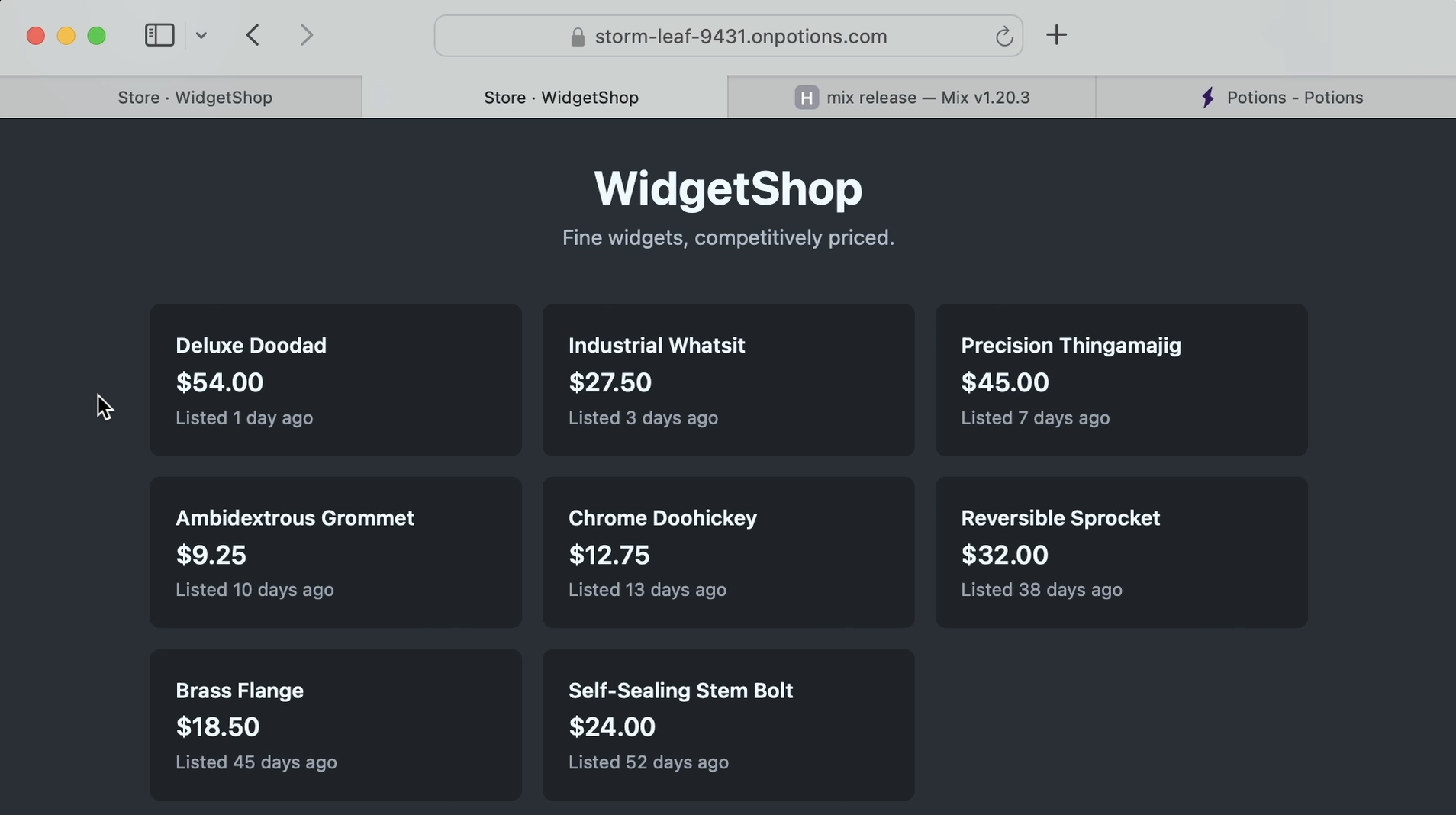
Now, we want to run our store efficiently, and part of that is not letting widgets sit unsold for too long. We'll update our app so that any widget that hasn't sold in 30 days is discounted by 10 percent, and we'll display a "Price reduced" tag so our customers know it's on sale.
Let's open our widget_shop app in our editor.
We have a Widget schema with fields for a name, a price, the date it was listed_on, and a price_reduced boolean. When we drop the price of a widget, we'll need to set that to true.
schema "widgets" do
  field :name, :string
  field :price, :decimal
  field :listed_on, :date
  field :price_reduced, :boolean, default: false

  timestamps(type: :utc_datetime)
end
Then if we open the StoreLive LiveView, we can see that when price_reduced is true, the widget displays a "Price reduced" tag.
<div class="flex items-center gap-2">
  <span class="text-xl font-semibold">{price(widget)}</span>
  <span :if={widget.price_reduced} class="badge badge-warning badge-sm font-medium">
    Price reduced
  </span>
</div>
Part 1 - The repricing task, the Mix way
Alright, let's get started.
There's already an Inventory context module, so let's open it and add two public functions.
The first one we'll define is reprice_stale/0. This will discount any widgets that have been for sale for 30 days or more.
We'll need a query to get all the old, or stale, widgets to reprice. Instead of writing that query inside the function, let's give it a home of its own in a new private function named stale_query.
We'll first need to calculate the cutoff, which we can do by calling Date.add with the current date and negative 30, since we want any widgets that have been listed for 30 days or more.
Then with our cutoff we can write our query: all widgets where the listed_on date is on or before the cutoff and price_reduced is false.
defp stale_query do
  cutoff = Date.add(Date.utc_today(), -30)

  from w in Widget,
    where: w.listed_on <= ^cutoff and w.price_reduced == false
end
Now that we have our stale_query, let's go back to reprice_stale. Rather than loading every stale widget into memory and saving each one back individually, we'll have the database do the work in a single UPDATE.
We'll take the stale_query and pipe it into update, binding each matching widget row to w.
Then we'll add a set clause to the query. This lets us specify what should change on every row that matches. We need to update three fields: price, price_reduced, and updated_at.
For price we'll apply a 10 percent discount. Let's define @discount as a module attribute that holds a Decimal of 0.9. Then we'll use a fragment to take the row's current price, multiply it by the @discount we're pinning in, and round it to two decimal places. This calculation is done at the database level.
For price_reduced we'll just set it to true.
And because we're using Repo.update_all instead of Repo.update!, Ecto won't bump the updated_at timestamp for us, so we'll set it here with DateTime.utc_now().
Then we'll pipe our query into Repo.update_all, which updates all of our stale widgets in a single query. It returns a two-element tuple: the number of rows it updated, and any rows the database sends back. The second element is only populated when the query has a select, so we can ignore it here.
Let's bind the count to a variable we'll call repriced_count, and use it to build a short summary that tells us how many widgets were discounted. We'll print it with IO.puts.
While we're here, let's create one more function, stale_count. Inside it we'll use Repo.aggregate, passing in our stale_query and :count, to return the number of stale widgets our query finds.
@discount Decimal.new("0.90")

def stale_count do
  Repo.aggregate(stale_query(), :count)
end

def reprice_stale do
  {repriced_count, _} =
    stale_query()
    |> update([w],
      set: [
        price: fragment("round(? * ?, 2)", w.price, ^@discount),
        price_reduced: true,
        updated_at: ^DateTime.utc_now()
      ]
    )
    |> Repo.update_all([])

  IO.puts("Reduced #{repriced_count} stale widgets")
end

defp stale_query do
  cutoff = Date.add(Date.utc_today(), -30)

  from w in Widget,
    where: w.listed_on <= ^cutoff and w.price_reduced == false
end
Now let's create a Mix task so we can run this from the command line. We'll create a new file in lib/mix/tasks called widget_shop.reprice.ex to define our task.
A Mix task is just a module under the Mix.Tasks namespace that calls use Mix.Task. It also needs to implement run/1, so let's define that. We can ignore the args since we won't need them.
Then inside run/1 we just need to call the WidgetShop.Inventory.reprice_stale() function we implemented.
defmodule Mix.Tasks.WidgetShop.Reprice do
  use Mix.Task

  @impl Mix.Task
  def run(_args) do
    WidgetShop.Inventory.reprice_stale()
  end
end
A Mix task does not start your application by default. So if we go to the command line and call our new task, it crashes, because reprice_stale calls Repo and Repo hasn't been started. That's exactly the error we get back:
$ mix widget_shop.reprice
** (RuntimeError) could not lookup Ecto repo WidgetShop.Repo because it was not started or it does not exist
To fix this we'll go back to our task and add the @requirements module attribute, listing any tasks that need to run before ours. We'll add ["app.start"].
Let's also add a @shortdoc for our task. This is what shows up when mix help is run, and it will make our task easier to find in the future.
defmodule Mix.Tasks.WidgetShop.Reprice do
  @shortdoc "Reprices widgets that have been listed for 30+ days"

  use Mix.Task

  @requirements ["app.start"]

  @impl Mix.Task
  def run(_args) do
    WidgetShop.Inventory.reprice_stale()
  end
end
Now let's try running it again.
$ mix widget_shop.reprice
Reduced 3 stale widgets
Perfect! Three widgets were updated.
Let's start up our development server so we can verify that those widgets have the "Price reduced" badge.
$ mix phx.serverYep, the three widgets that are older than 30 days each have the "Price reduced" badge.
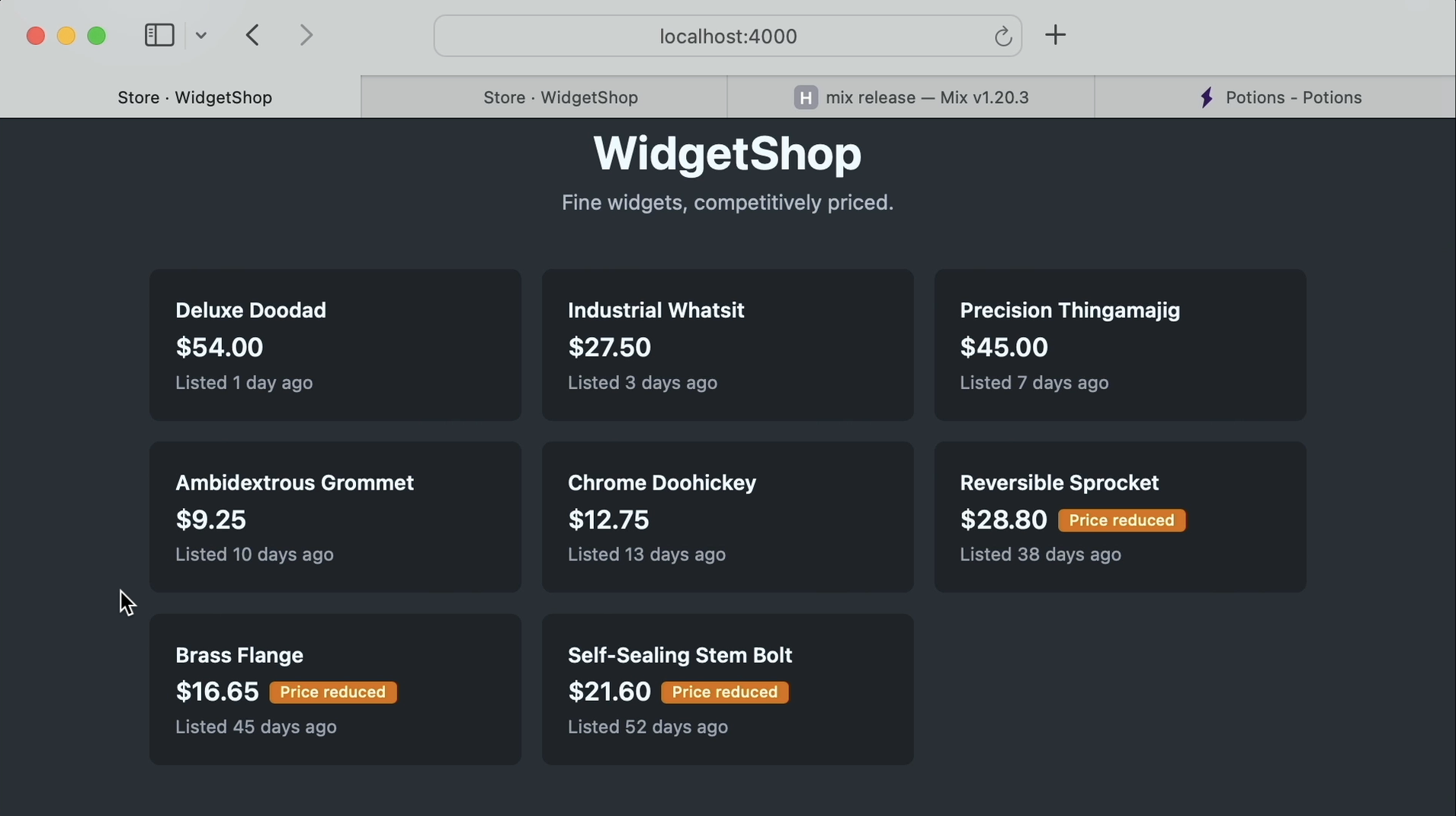
Great, now that we've verified this works in our development environment, let's deploy it to production.
Part 2 - Deploy it
Back on the command line, let's check our changes with git status. We see our changes to the inventory module and the new Mix task. Let's stage them, commit them, and push them to our remote repo on GitHub.
$ git status
$ git add .
$ git commit -m "Reprice stale widgets"
$ git push origin main
Now that our changes are on GitHub, we can deploy them with Potions. We'll open Potions and start a deploy.
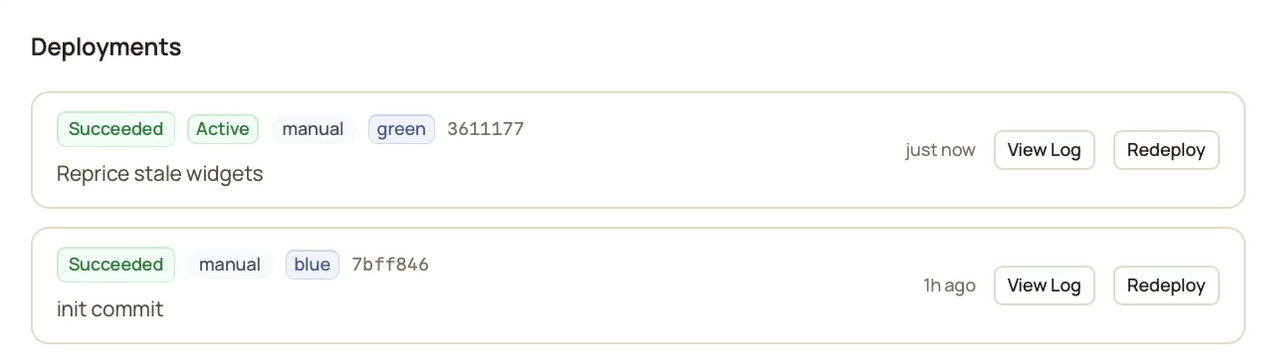
Let's skip ahead to the successful deployment. But before we leave the page, notice that our deployment went into the "green" slot. We'll need to know this so we can find the right slot on the server.
With those changes deployed, let's SSH into the server so we can get a better idea of how Elixir lets us run tasks with releases.
Potions creates a deploy user you can SSH in with, so I'll use that here.
$ ssh deploy@<your-server-ip>
On the server, Potions puts each app you create in the /opt/potions directory, so let's have a look around.
$ cd /opt/potions/widget_shop
$ ls
blue  green  releases  storage
We see both a blue and a green directory. These are the deploy slots. Potions alternates between them on each deploy so it can start the new release next to the old one and then cut over with no downtime.
Our current deploy is live in the green slot, so let's cd into that directory. Now, because we're in our production environment, if we try to run our task like we did in development, it won't work.
$ cd green
$ mix widget_shop.reprice
-bash: mix: command not found
It fails right away because there's no Mix.
When you deploy with Elixir releases, which is what Potions uses, you don't get Mix. Mix is a build tool, and it isn't included inside a release.
In fact, if we look at what is here, we have:
-
bin: the release's management script. -
erts-16.3: the Erlang VM. -
lib: our application and its dependencies. -
releases: the boot scripts and config for this build. -
storage: persistent file storage that Potions adds.
$ ls
bin  erts-16.3  lib  releases  storage
Part 3 - bin/widget_shop: remote, rpc, and eval
Every release comes with a management script named after your app. Let's run it with no arguments:
$ bin/widget_shop
Usage: widget_shop COMMAND [ARGS]

The known commands are:

    start          Starts the system
    start_iex      Starts the system with IEx attached
    daemon         Starts the system as a daemon
    daemon_iex     Starts the system as a daemon with IEx attached
    eval "EXPR"    Executes the given expression on a new, non-booted system
    rpc "EXPR"     Executes the given expression remotely on the running system
    remote         Connects to the running system via a remote shell
    restart        Restarts the running system via a remote command
    stop           Stops the running system via a remote command
    pid            Prints the operating system PID of the running system via a remote command
    version        Prints the release name and version to be booted
For our purposes, the commands we care about are remote, rpc, and eval. These are the three we mentioned at the start: three different ways to run code in our release.
Let's start by taking a closer look at remote.
I'll clear the screen, and if we try to run bin/widget_shop remote here, we can't connect.
That's because our shell needs the same environment variables the app was started with. Most importantly the node name, so our shell can find the running node and connect to it.
Potions keeps the variables for each slot in an env file next to the slots, so let's load it into our shell and auto-export it:
$ set -a; . /opt/potions/widget_shop/.env.green; set +aWith that, we can run commands against our release.
remote - an IEx shell inside production
remote connects us to our live production node. From here we can run code in our production environment, so let's run our Inventory.stale_count() function to check that it works.
$ bin/widget_shop remote
Erlang/OTP 28 [erts-16.3] ...

Interactive Elixir (1.20.2) - press Ctrl+C to exit (type h() ENTER for help)
iex(widget_shop_green@127.0.0.1)1> WidgetShop.Inventory.stale_count()
3
Great, we have three stale widgets in production.
For a one-off run, this works. In fact, the steps we just took are the same ones Potions uses to connect to your server when you open a console for your app from the Potions UI.
rpc - one-shot commands on the running app
Now let's look at the next command: rpc.
rpc takes an Elixir expression as a string, connects to the running node, executes the expression there, and exits.
Let's try it with our stale_count function.
$ bin/widget_shop rpc "WidgetShop.Inventory.stale_count()"
$
It ran, but we didn't get anything back. Unlike IEx, rpc doesn't echo the return value.
To see the value, let's pipe it into IO.puts.
$ bin/widget_shop rpc "WidgetShop.Inventory.stale_count() |> IO.puts()"
3
And great, "3" is printed.
One thing to keep in mind with rpc is that it talks to a running system. If your app is down, there's nothing to talk to and you'll get an error.
But what if you need to run code when your app isn't running?
eval - a fresh VM, nothing started
For that we can use eval.
eval doesn't connect to the running app at all. It starts a fresh, minimal VM, runs your expression, and exits. Nothing gets started for you unless you start it yourself.
That might sound limiting, but it's perfect for one common task: database migrations, which need to run before the app boots and takes traffic. This is what Potions uses to run your database migrations when you deploy.
$ bin/widget_shop eval "WidgetShop.Release.migrate()"
18:17:46.971 [info] Migrations already up
Since our deploy already ran the migrations, it simply reports that they're up to date.
Here's the rule of thumb:
-
remoteis an interactive shell, great for exploring and debugging. -
rpcis for running a command against the running app, with its database pool, its caches, and its live state. -
evalis for when the app might not be running, or must not be.
For our repricing job, the app needs to be up and we want its database, so we'll use rpc:
$ bin/widget_shop rpc "WidgetShop.Inventory.reprice_stale()"We could run this right here, but having to SSH into the server and run this command every day isn't realistic. Instead, let's schedule it.
Part 4 - Scheduling it with Potions
Potions has Scheduled Tasks, which make it easy to run tasks like this on a recurring schedule. You can also trigger a run on demand whenever you need to, all from the Potions UI.
Let's open our app in Potions and head to the Scheduled Tasks tab.
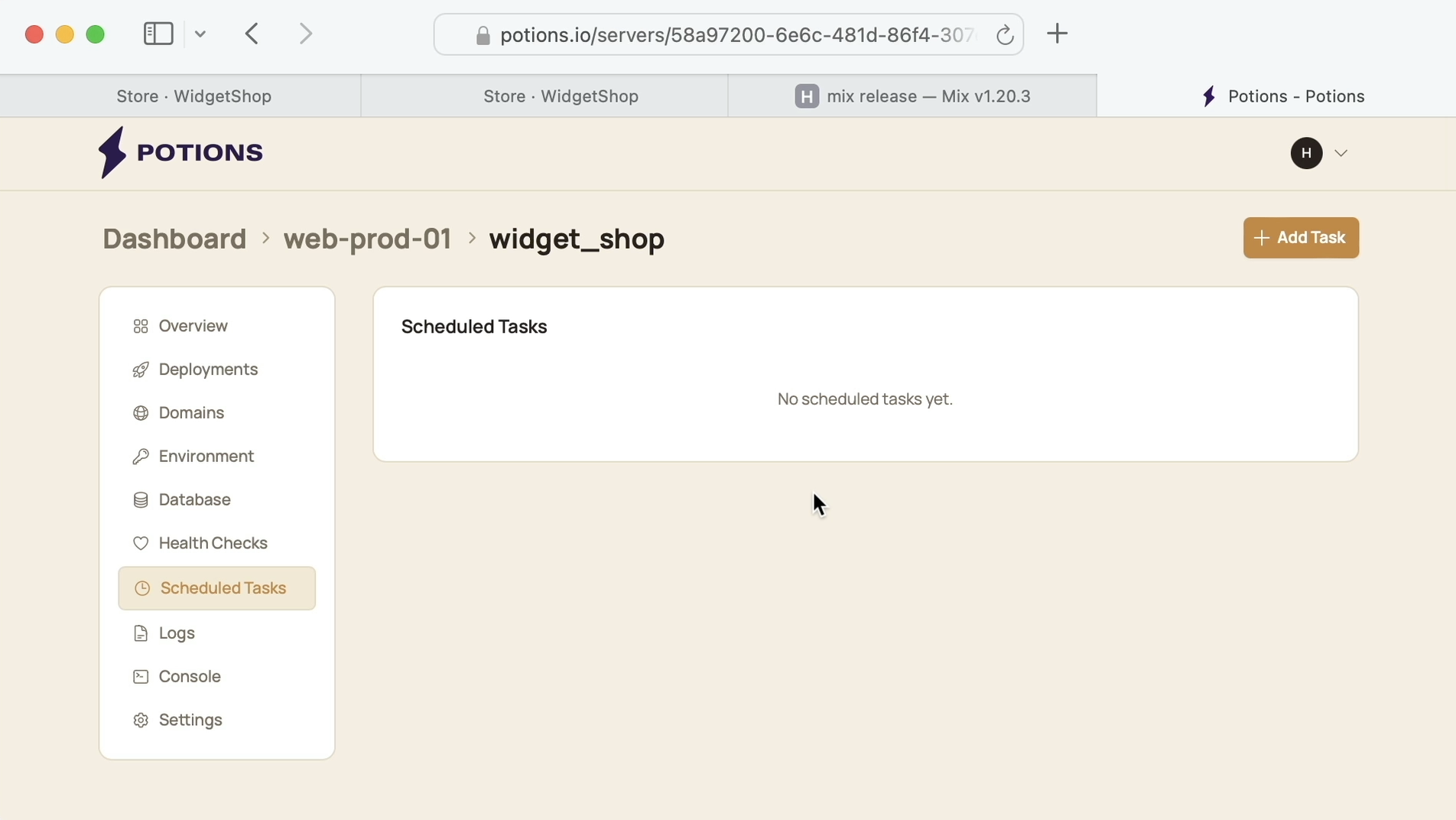
We'll add a task. For the name, let's call it "Reprice widgets".
For the command, we'll enter WidgetShop.Inventory.reprice_stale(). We don't use shell commands here. Instead, we use an Elixir expression: the same string we were about to run a moment ago.
Then we can schedule it. Let's set it to run daily at 6:00 AM UTC.
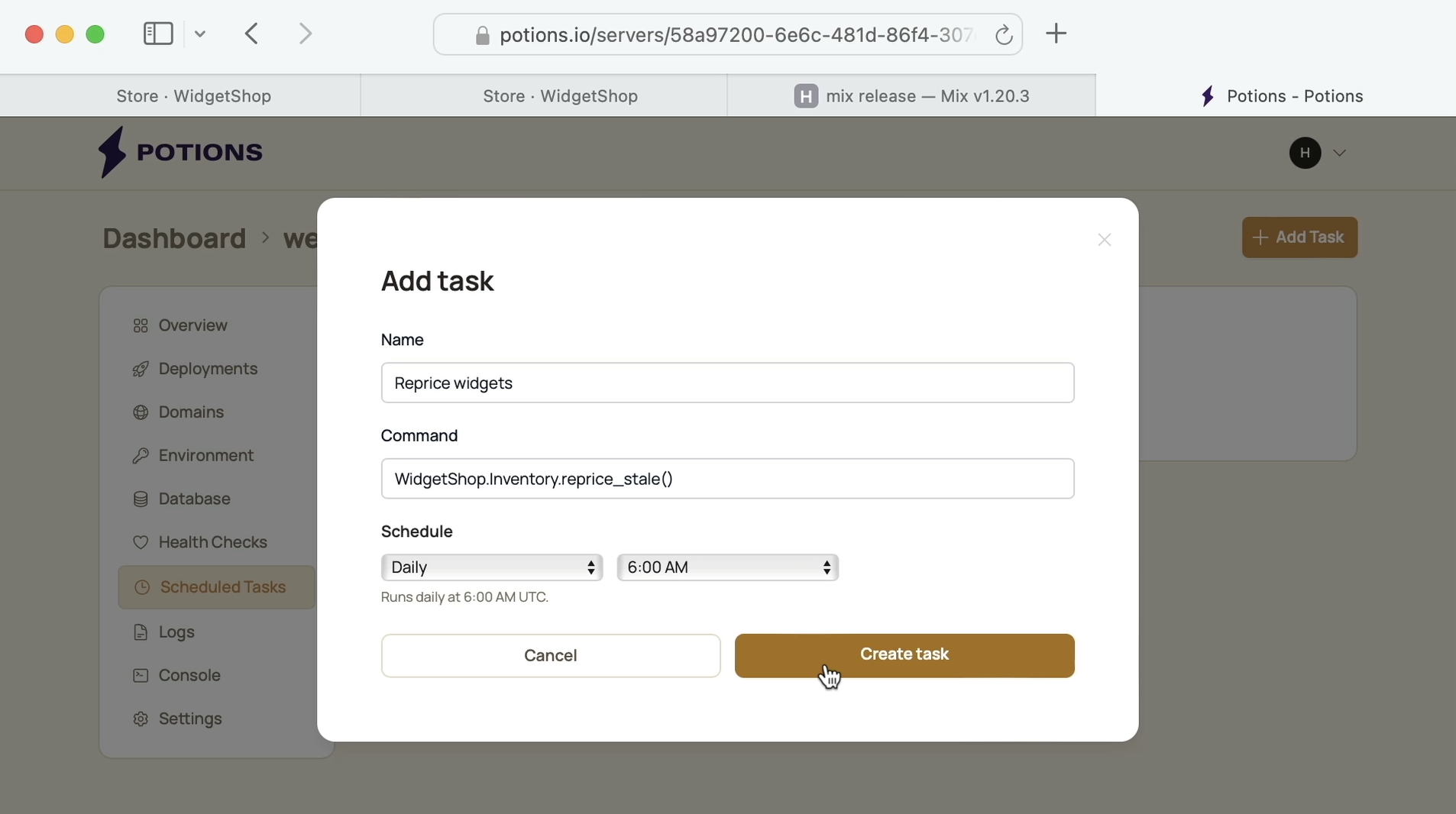
Now every day at 6:00, Potions will run the same steps we just did by hand: SSH into the server, load the active slot's env file, and run bin/widget_shop rpc with our expression.
One benefit of using Potions for this is that it captures the output, records the status and duration, and sends us an alert if the task fails.
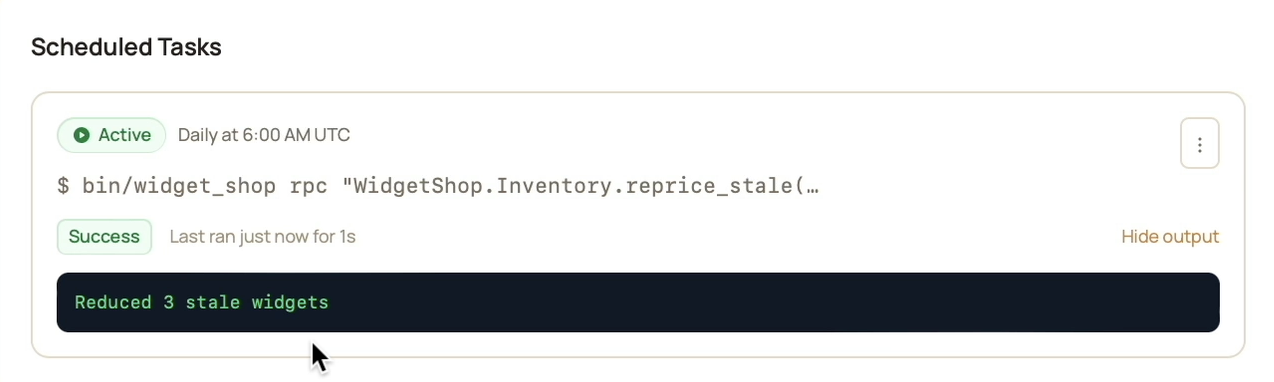
And we don't need to wait for the next scheduled run to update our widget pricing. Let's go ahead and use Run Now.
The task flips to running...
and once it finishes we can see the output: "Reduced 3 stale widgets".
Now let's do one last check to see that the updated prices show up on our storefront.
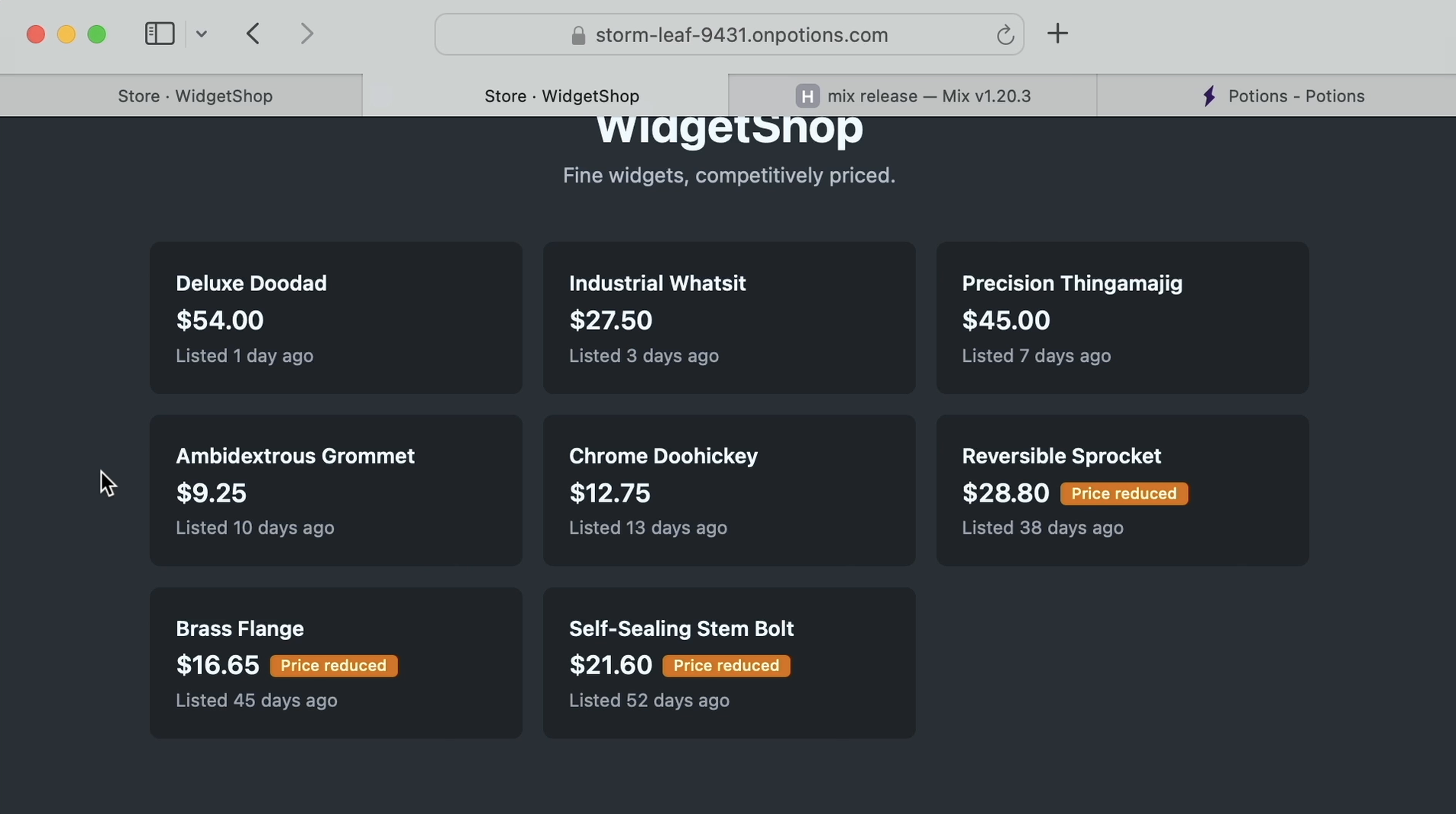
Perfect! Three widgets now have reduced prices and "Price reduced" tags, all live on the site.
And with our new scheduled task running, any widget that hasn't sold in 30 days will have its price updated automatically.
The widget shop's source is available on GitHub.
Thanks for watching and happy deploying!
Deploy Elixir to servers you own.
Potions gives you push-to-deploy, zero-downtime releases and managed servers, with the control of plain infrastructure.
Start 14-day free trial